$
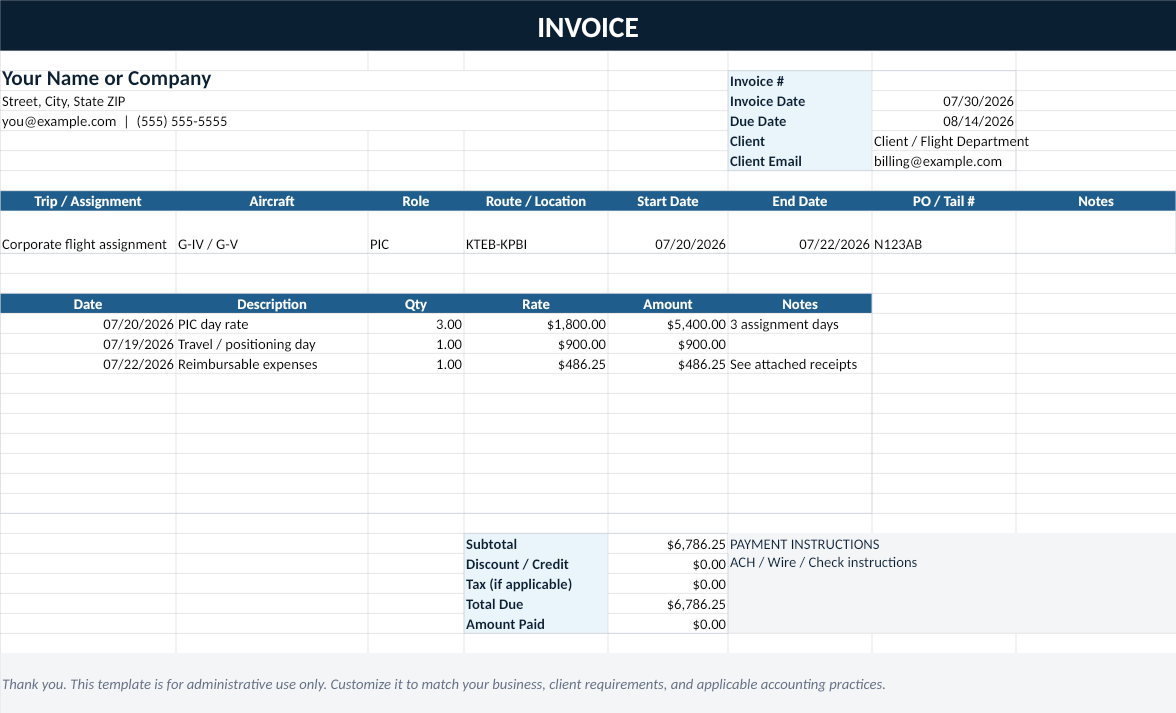
Invoice Builder
Create a clean invoice with assignment details, billable line items, automatic totals, and payment instructions.
A complete business administration system for contract pilots and corporate flight attendants: invoice clients, track income and expenses, calculate rates and per diem, measure trip profitability, organize taxes, monitor credentials, and manage contractor onboarding.
Secure checkout through Stripe, with PayPal available as an alternative. Instant access after payment. Excel-compatible workbook plus PDF and editable DOCX guides.
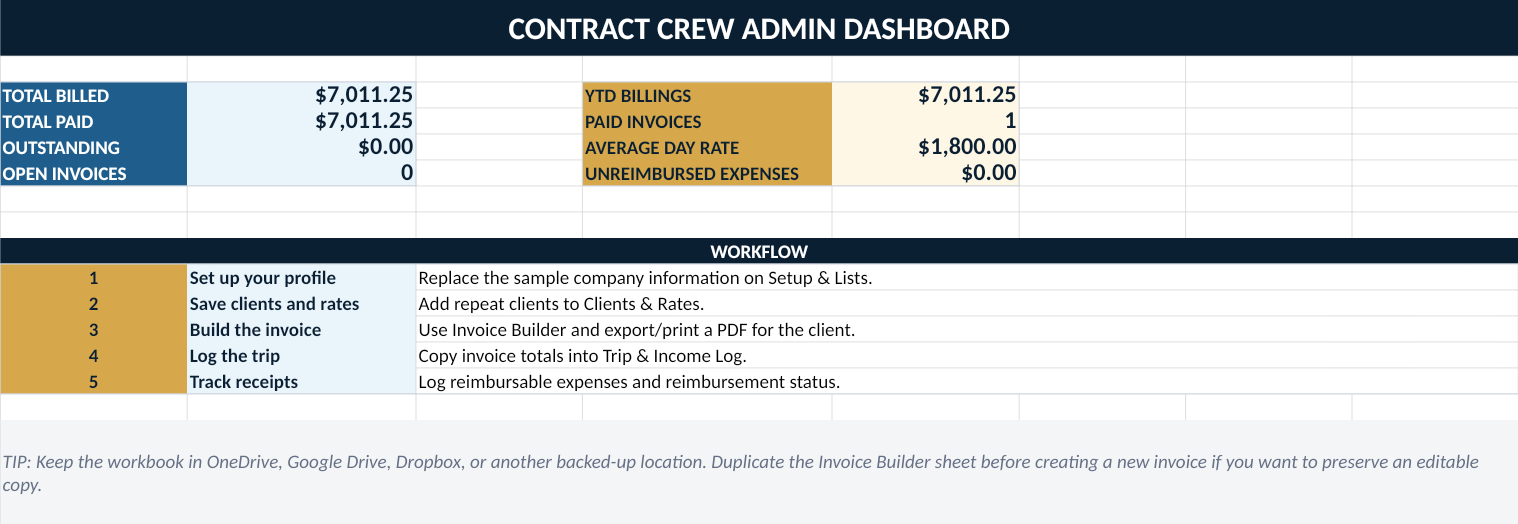
Designed to replace scattered invoice files, receipt notes, client rate lists, and unpaid invoice reminders with one repeatable process.
Create a clean invoice with assignment details, billable line items, automatic totals, and payment instructions.
Track invoice status, due dates, gross billings, amounts paid, and remaining balances in one table.
Record reimbursable expenses, receipt status, submission dates, and reimbursement dates.
Save billing contacts, standard day rates, travel rates, per diem, payment terms, and client notes.
Estimate a sustainable rate using revenue goals, realistic billable utilization, business expenses, and a buffer.
Includes a five-page quick-start guide and a printable pre-send invoice checklist in PDF and editable DOCX formats.
Open the Setup sheet, replace the sample information, delete the sample rows, and the kit is ready for your next assignment.
This is an administrative productivity kit, not flight scheduling software or an accounting platform.
Keep day rates, travel days, per diem, expenses, and payment status connected to the same invoice number.
Itemize assignment days and reimbursable trip costs while maintaining a clean record of receipts and reimbursements.
Start with a professional workflow instead of assembling unrelated templates from scratch.
Use the separate team license for a shared standard across multiple contractors or a small flight department.
No monthly software charge and no account required after the files are downloaded.
Single-user license for an independent aviation contractor.
The workbook is delivered as an XLSX file for Microsoft Excel and other spreadsheet applications that support standard XLSX files. The guides are supplied as PDF and editable DOCX files.
No. It creates and tracks the administrative records. You export the invoice as PDF and send it through your normal email and payment workflow.
Yes. The workbook includes a Setup & Lists sheet where the profile information and most dropdown choices can be customized.
The standard purchase is a single-user license. A team license is required for shared use by multiple contractors or a flight department.
No. It is an administrative productivity tool. You are responsible for adapting it to your agreements, business structure, client requirements, jurisdiction, and professional guidance.
Because this is an instant digital product, sales are generally final after access except where required by law or when the files are defective and cannot be replaced. Contact support when a file is damaged or inaccessible.
Zero to experienced: training curriculum, regulatory guide, and career system for Part 91/135 long-haul crew.
Download the one-page Contract Crew Invoice Checklist.